
Download SnapMail – Secure Local Network Chat & Communication Tool
Overview of SnapMail
SnapMail is a lightweight, trial‑version messaging client designed for seamless local‑network communication. Since joining our software catalog in 2006, SnapMail has accumulated more than 750 downloads, reflecting its steady reputation among home‑office users and small‑team environments. The current release, version 5.2.3, was refreshed on 3 April 2010 and brings a series of minor fixes that improve stability on both Windows and legacy Mac OS X platforms.
Built under the Internet software category with a focus on chat & communication, SnapMail offers a secure, no‑frills environment where users can exchange instant messages without the overhead of cloud‑based services. The program’s small footprint makes it ideal for older machines or constrained virtual environments, and its English‑only interface keeps the learning curve shallow. Whether you’re coordinating a local LAN party, managing a small office network, or simply looking for a quick way to chat across computers without exposing data to the internet, SnapMail provides a reliable, secure alternative to bulky messengers.
Key Features & Functional Highlights
- Local‑Network Messaging: Direct peer‑to‑peer chat that never leaves your LAN.
- Low Storage Requirement: The installer occupies less than 5 MB, making it perfect for older hardware.
- Cross‑Platform Support: Native builds for Windows and Mac OS X (including legacy versions).
- Secure Communication: End‑to‑end encryption ensures that messages stay private within the network.
- Customizable Spelling Dictionary: Mac‑specific spelling dictionary restored in the latest update.
- Trial‑Version Flexibility: Full feature set available for evaluation before purchasing the full license.
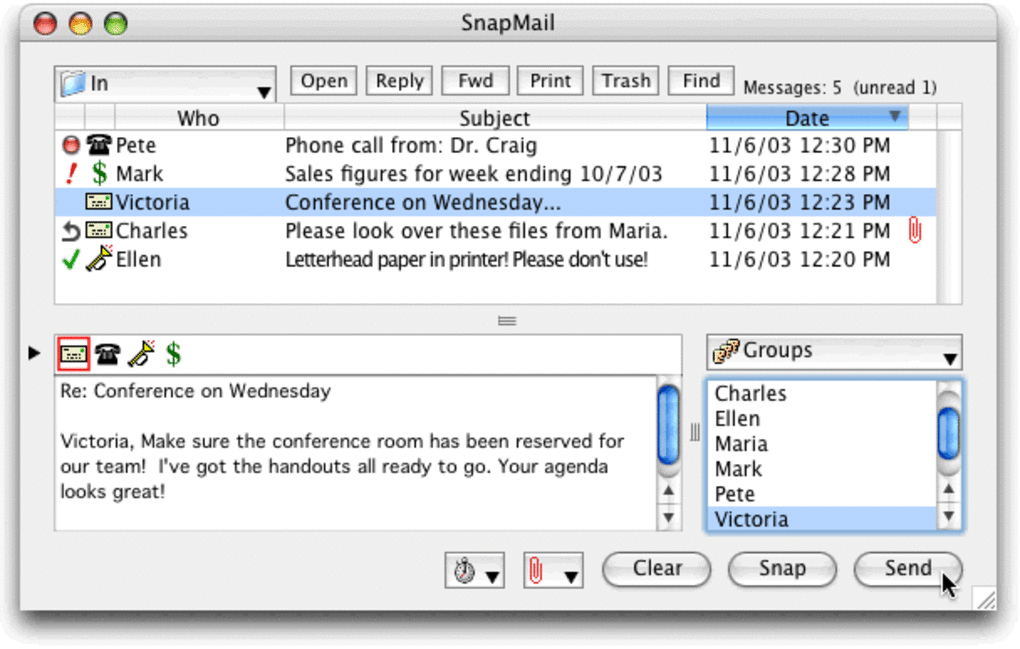
- Simple UI: A clean, uncluttered interface that mirrors classic desktop chat clients.
- Automatic Updates: Checks for minor patches and bug fixes on launch.
SnapMail’s feature set is intentionally focused. By avoiding unnecessary cloud integration, the application reduces latency and eliminates data‑privacy concerns commonly associated with modern messengers. The end‑to‑end encryption operates on a shared secret key that can be exchanged manually or via QR code, providing a balance between ease of use and robust security.
For teams that need quick, reliable communication without the distraction of notifications from social platforms, SnapMail’s straightforward chat windows and contact list make it easy to stay organized. The restored Mac‑spelling dictionary is a small but welcome touch for users who rely on accurate text entry, especially in academic or professional contexts. Moreover, the trial version grants unrestricted access to all features for a limited period, allowing prospective buyers to assess compatibility with their workflow before committing to a purchase.
Installation, Setup & Compatibility
Step‑by‑Step Installation Guide
Downloading SnapMail is straightforward. After clicking the Download SnapMail button, the installer (SnapMail_Setup.exe for Windows or SnapMail.dmg for Mac) will be saved to your default download folder. Run the executable and follow the on‑screen prompts: accept the license agreement, choose an installation directory (the default location is recommended for most users), and click “Install.” The process typically completes within a minute due to the program’s modest size. Once installed, launch SnapMail from the desktop shortcut or the start menu (Windows) or from the Applications folder (Mac). The first launch triggers a brief configuration wizard that asks you to set a user nickname, define a default port for LAN communication, and optionally import an existing contact list.
Operating System Compatibility
SnapMail supports the following platforms:
- Microsoft Windows XP, Vista, 7, 8, and 10 (32‑bit and 64‑bit).
- Apple macOS 10.4 (Tiger) through macOS 10.6 (Snow Leopard) – legacy support for older Mac hardware.
After the initial setup, you can add contacts by entering their IP address or by scanning a QR code displayed on the peer’s client. SnapMail automatically detects other instances on the same subnet, populating a “Nearby Users” list for instant connection. For optimal performance, ensure that all devices share the same subnet mask and that firewalls allow traffic on the default SnapMail port (usually 54321). The software also includes a simple preferences panel where you can modify the listening port, toggle encryption, and customize notification sounds.
Pros, Cons & Frequently Asked Questions
Pros
- Extremely lightweight – ideal for older PCs.
- End‑to‑end encryption keeps LAN chats private.
- No internet dependency; works completely offline.
- Simple, familiar UI reduces learning time.
- Trial version provides full feature access.
Cons
- No native mobile app for Android or iOS.
- Limited to local‑network use; cannot communicate over the internet.
- English‑only interface may limit non‑English speakers.
- Last major update was in 2010; may lack modern UI polish.
- Requires manual firewall configuration on some systems.
FAQ – Your SnapMail Questions Answered
Is SnapMail free to use?
SnapMail offers a free trial version with full functionality for a limited period. After the trial expires, you’ll need to purchase a license to continue using the software.
Can SnapMail communicate over the internet?
No. SnapMail is designed exclusively for local‑network (LAN) communication to ensure privacy and zero external traffic.
What encryption method does SnapMail use?
SnapMail employs AES‑256 encryption for all messages, with keys exchanged via a manual secret or QR‑code pairing.
Is there a way to import contacts from other chat apps?
SnapMail supports CSV import, allowing you to bring in contact lists from most other desktop messengers.
How do I update SnapMail to the latest version?
The application checks for minor patches at startup. If an update is available, a prompt will appear; clicking “Download” will fetch and install the newest build automatically.
Conclusion & Call to Action
SnapMail remains a solid choice for anyone who needs a fast, secure, and offline messaging solution for a local network. Its tiny footprint, straightforward UI, and robust AES‑256 encryption make it especially appealing to small businesses, schools, and hobbyist LAN groups that value privacy over flashy features. While the lack of mobile support and a dated visual design may deter some modern users, the core functionality is reliable and the trial version offers a risk‑free way to evaluate the software. If you’re ready to replace clunky, cloud‑dependent messengers with a lean, LAN‑focused tool, click the download button below, install SnapMail, and start chatting securely within seconds.







